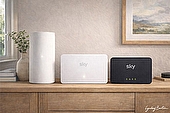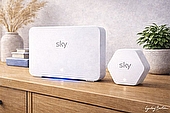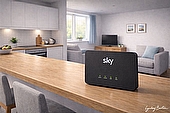
The Sky Max Hub is supplied with Sky's full-fibre broadband packages, replacing the earlier Sky Broadband Hub.
It supports the WiFi 6 wireless standard, allowing faster wireless speeds and improved performance with multiple connected devices.
It also forms the base of Sky's WiFi Max system, which adds mesh boosters called Sky Max Pods to extend WiFi coverage around the home.

Quick answer: What is the Sky Max Hub?
The Sky Max Hub is Sky's main WiFi 6 router, supplied with its full-fibre broadband packages and the WiFi Max upgrade service.
Key facts:
- WiFi 6 router supplied with Sky full-fibre broadband plans
- Supports broadband line speeds up to 1Gbps
- Gigabit Ethernet ports and 1Gbps WAN connection from the ONT
- Works with Sky Max Pods for mesh WiFi coverage
- Managed through the MySky app for device controls and security tools
The router supports broadband speeds up to 1Gbps, with gigabit Ethernet ports and a 1Gbps WAN connection from the ONT. Over WiFi, real-world speeds of 600-900Mbps in ideal conditions when close to the router when using compatible WiFi 6 devices, although this can drop to 300-600Mbps even across the same room, and further through walls and ceilings.
To extend WiFi coverage throughout larger homes, the Max Hub works with Sky Max Pods - mesh boosters supplied through the WiFi Max add-on.
The biggest improvements over older Sky routers are most noticeable on WiFi 6 compatible devices, including newer phones, laptops, and Sky TV hardware such as Sky Glass and Sky Stream.
The Max Hub is not compatible with Sky Q, however - customers who subscribe to Sky Q remain on the older Sky Broadband Hub, and the WiFi Max add-on is not available to them.
Sky Max Hub specifications
The table below summarises the key hardware and wireless features of the Sky Max Hub router.
| Sky Max Hub | |
|---|---|
| Router model | Sky Max Hub (SR213) |
| WiFi standard | WiFi 6 (802.11ax) |
| WiFi bands | Dual-band (2.4 GHz / 5 GHz) |
| Maximum broadband speed | Up to 1 Gbps |
| WAN port | 1 Gbps |
| Ethernet ports | Gigabit Ethernet |
| Security | WPA2 / WPA3 |
| Parental controls | Sky Broadband Shield, My Sky app |
| Mesh support | Sky Max Pods |
| Launch year | 2023 |
Who gets the Sky Max Hub
The Sky Max Hub is supplied with all of Sky's full-fibre broadband packages - Full Fibre 75, 150, 500 and Gigafast - and with the WiFi Max add-on.
Customers joining Sky on a full-fibre contract today will now receive it as standard.
Those on older FTTC or ADSL packages will most likely have the Sky Broadband Hub or Sky Q Hub, both of which remain widely used across Sky's existing customer base.
Sky doesn't replace routers automatically when a contract is renewed or a speed tier changes, so it's quite possible to be on a faster package while still running older hardware.
Upgrading to a Full Fibre plan is the most straightforward way to get the Max Hub, as it comes included. Adding WiFi Max - which costs around £4 per month - will also trigger a hardware swap, with the Max Hub supplied as part of the service alongside Sky Max Pods where additional coverage is needed.
Customers who want the Max Hub without switching package can request one directly from Sky, though a charge may apply depending on their contract.
Hardware and connectivity
The Sky Max Hub (model SR213) is a compact, white vertical router - noticeably different in appearance from the older Sky Broadband Hub. It stands 16.5cm tall and is designed to sit upright, giving it a smaller footprint on a shelf or desk.
Ventilation slots run along the sides and base of the unit, allowing heat to dissipate during normal operation. All eight antennas are internal, keeping the exterior clean with no external aerials.
The hub broadcasts dual-band WiFi 6 (802.11ax) across both 2.4GHz and 5GHz - it does not support the 6GHz band, despite the name suggesting otherwise.
It supports MU-MIMO 4x4, allowing the router to communicate with multiple devices simultaneously rather than serving them one at a time. WiFi channel selection is handled automatically, with the hub scanning for interference and adjusting accordingly. Unlike the older Sky Broadband Hub, users cannot manually select WiFi channels.
On the rear are four gigabit Ethernet ports - one of which can operate as the WAN port - alongside a DSL port, phone port, and power socket. There is also a USB-C port, though this is for charging devices only and does not support data transfer or network-attached storage.
On full-fibre installations, the Max Hub connects to the Optical Network Terminal (ONT) via the WAN port using a standard Ethernet cable. The ONT is the small box installed by an engineer when full fibre is first activated, and acts as the handoff point between the fibre line and the router.
The DSL port is present on the hub but is only used on copper broadband connections such as FTTC - it plays no role on a full-fibre setup. Sky hubs do not offer a dedicated bridge mode, which can limit flexibility for users who prefer to run their own third-party router or more advanced home network configuration.
The hub has a single indicator light on the front, which changes colour and flash pattern to communicate its current status. In normal use, the light will show solid white when the hub is connected and working. Red indicates a fault or loss of internet connection. Other colours - including green, amber, and blue in various solid or flashing combinations - appear during setup and maintenance tasks such as pairing a Sky Max Pod, authenticating a connection, installing updates, or resetting the hub.
Performance and speed limits
The Sky Max Hub is designed to support broadband speeds of up to 1Gbps, which matches the speed limit of its gigabit Ethernet ports. Both the WAN connection from the ONT and the LAN ports on the router are gigabit Ethernet, meaning wired devices can reach the full speed of Sky's fastest standard packages - up to 900Mbps on Full Fibre Gigafast.
Wireless performance is handled by dual-band WiFi 6 radios (2.4GHz and 5GHz) using a 4x4 MU-MIMO configuration and eight internal antennas. In practical terms, this allows the router to transmit multiple data streams simultaneously and manage several active devices more efficiently than older Sky routers. Customers upgrading from the Sky Broadband Hub may notice less of a jump, however, as that router also uses a 4x4 MU-MIMO design.
On a compatible WiFi 6 device, speeds of 600-900Mbps are achievable in ideal conditions when close to the router on a gigabit fibre connection. In the same room or nearby rooms, speeds typically fall into the 400-700Mbps range, while devices further away or behind walls may see 100-400Mbps depending on the layout of the home.
Devices that do not support WiFi 6 will still connect normally, falling back to the highest WiFi standard they support, such as WiFi 5 or WiFi 4.
For larger homes, Sky Max Pods can be added to extend coverage. Up to three pods are available through the WiFi Max add-on, forming a mesh network that keeps all devices connected to a single WiFi network while extending the signal into rooms further from the router.
Where the Max Hub reaches its limit is multi-gigabit broadband. Because its Ethernet ports are limited to 1Gbps, it cannot pass speeds above that level. Sky's newer Gigafast+ packages, which offer symmetrical speeds of 2.5Gbps and 5Gbps, are instead supplied with the Gigafast+ Hub - a WiFi 7 router with multi-gigabit Ethernet ports designed to handle the higher speeds.
For customers on Full Fibre 75, 150, 500, or Gigafast (900), the Max Hub is capable of delivering the full available line speed.
Sky WiFi Max and mesh coverage
The Sky Max Hub sits at the centre of Sky's mesh WiFi system, but the mesh coverage itself comes from a separate add-on. WiFi Max is a paid add-on, currently priced at £4 per month, which adds whole-home WiFi coverage on top of the standard broadband service.
While the Max Hub covers the immediate area around the router, Sky Max Pods extend that coverage into rooms further away. Up to three pods can be supplied depending on the layout of the home, and they form a single seamless network rather than creating separate WiFi signals that devices have to switch between manually.
The in-room speed guarantee varies by package - customers on Full Fibre 150 and above are guaranteed at least 25Mbps in every room, while those on lower-tier plans are guaranteed 10Mbps. If those speeds are not met, Sky will first supply additional pods and, if needed, arrange an engineer visit.
WiFi Max also unlocks additional controls in the MySky app, including device-level management, the ability to pause WiFi access for individual devices, and Advanced Security tools.
For a full breakdown of what WiFi Max includes, how it compares to competitors, and whether it's worth the cost, see our Sky WiFi Max review.
Will the Sky Max Hub make a difference?
The Sky Max Hub is a capable router, but it is one part of a chain - and upgrading it will not automatically result in faster speeds if other parts of that chain are the limiting factor.
The three things that most commonly hold WiFi performance back have nothing to do with the router itself.
Line speed is the first. The Max Hub can only deliver what arrives from the street. On a Full Fibre 75 connection, even a perfect WiFi signal will top out at 75Mbps. The router becomes more relevant the faster the line - on Full Fibre 500 or Full Fibre Gigafast, a capable router makes a genuine difference to whether that speed actually reaches devices wirelessly.
Device capability is the second. WiFi 6 benefits only apply when both the router and the device support WiFi 6. An older laptop or smartphone connecting on WiFi 5 or WiFi 4 will not benefit from the Max Hub's newer standard, regardless of how close it sits to the router. For households running mostly older hardware, the practical difference over the Sky Broadband Hub may be modest.
Distance and interference is the third. Walls, floors, and neighbouring WiFi networks all degrade signal. A router placed in a hallway cupboard, or separated from the main living areas by thick stone walls, will underperform regardless of its specifications.
This is where Sky Max Pods become relevant. In larger homes, long flats, or properties with awkward layouts, a single router - however capable - will struggle to provide consistent coverage throughout. Placing one or two pods in weaker areas of the home often produces a more noticeable improvement than upgrading the router alone.
Where the Max Hub genuinely earns its place is in homes combining a fast full-fibre line, a high number of connected devices, and WiFi 6 compatible hardware. In that environment, the router's MU-MIMO 4x4 configuration and WiFi 6 support make a real difference to how smoothly the network handles simultaneous demand.
Limitations and customisation
The Sky Max Hub is a capable router for everyday home use, but it has a number of hardware and software limitations that are worth understanding before signing up - particularly for more technically minded users.
On the hardware side, the Max Hub supports WiFi 6 but not WiFi 6E or WiFi 7. WiFi 6E would add access to the less congested 6GHz band, and WiFi 7 would bring higher throughput and lower latency for compatible devices. For most current Sky packages neither is a practical gap, but customers who want the most future-proof hardware available will find the Max Hub already a generation behind the latest consumer routers.
The more significant hardware constraint is the 1Gbps ceiling on the WAN port. The Max Hub cannot pass speeds above 1Gbps, which is precisely why Sky developed the Gigafast+ Hub for its multi-gigabit packages. Customers on Gigafast+ plans requiring 2.5Gbps or 5Gbps symmetrical speeds are supplied with that router instead, as the Max Hub's gigabit Ethernet ports are physically incapable of handling those connections.
On the software side, Sky controls the hub's firmware remotely, pushing updates automatically without customer input. This keeps the router patched and maintained without any action required, but users have no say over when updates are applied or what they change.
The MySky app provides device visibility, parental controls, and security monitoring, but the hub itself offers limited advanced configuration compared to many third-party routers. Features commonly found on consumer routers - manual DNS settings, VLAN configuration, VPN server support, and detailed traffic monitoring - are either restricted or unavailable.
Sky's approach prioritises plug-and-play reliability over flexibility, which suits most households but is a genuine constraint for anyone who wants granular control over their home network.
Can you replace the Sky Max Hub with your own router?
Replacing the Sky Max Hub with a third-party router is possible, but it is not straightforward and is not officially supported by Sky.
Sky authenticates broadband connections using MER (MAC Encapsulated Routing) with DHCP Option 61 credentials - a method that ties the connection to the router's login details rather than simply the physical line. A third-party router will only work if it supports DHCP Option 61 configuration, which allows the correct credentials to be passed to Sky's network during authentication. Not all consumer routers support this, and even those that do require manual configuration to get working.
Customers who successfully set up a third-party router do so largely through community forums and self-help resources rather than any guidance from Sky. If connection problems arise after replacing the hub, Sky's support team is unlikely to assist beyond advising a return to the original router.
For users who want the benefits of their own hardware - more advanced configuration, better performance, or features the Max Hub doesn't offer - running a third-party router in place of the Max Hub is a viable option with the right equipment and some technical confidence. For everyone else, the Max Hub remains the simpler and fully supported choice.
How the Sky Max Hub compares
Within the UK broadband market, the Sky Max Hub sits in the mid-tier of provider-supplied routers - capable and current, but no longer at the leading edge.
The table below shows how it compares to the routers currently supplied by major UK providers.
| Sky Max Hub | Virgin Media Hub 5 | Vodafone Ultra Hub | EE Smart Hub 7 Plus | Sky Gigafast+ Hub | |
|---|---|---|---|---|---|
| WiFi standard | WiFi 6 | WiFi 6 | WiFi 7 | WiFi 7 | WiFi 7 |
| WiFi bands | Dual-band | Dual-band | Dual-band | Dual-band | Tri-band |
| 6GHz band | No | No | No | No | Yes |
| Security | WPA3 | WPA3 | WPA3 | WPA3 | WPA3 |
| Max WAN speed | 1Gbps | 2.5Gbps | 2.5Gbps | 2.5Gbps | 10Gbps |
| Mesh support | Yes (paid) | Yes (free on Gig1/Volt) | Yes (included with Pro 3) | Yes (paid) | Yes (included) |
| Included as standard | All full-fibre plans | All plans (rollout) | Pro 3 plans | All full-fibre plans | Gigafast+ plans only |
Virgin Media's Hub 5 is now being rolled out to customers with older Hub 3 and Hub 4 routers as part of a free upgrade programme that began in late 2025. Like the Max Hub, it supports WiFi 6 on dual-band 2.4GHz and 5GHz channels with WPA3 security. The more notable difference is Virgin's approach to mesh coverage - boosters are included free with Gig1 and Volt plans, whereas Sky charges £4 per month for the equivalent WiFi Max add-on.
Vodafone's Ultra Hub, supplied with its Pro 3 broadband packages across both Openreach and CityFibre networks, supports WiFi 7 - a step up from the Max Hub's WiFi 6. WiFi 7 brings higher transmission rates and Multi-Link Operation (MLO), which allows multiple channels to be used simultaneously. Vodafone also bundles a Super WiFi 7 booster and 4G backup as part of the Pro 3 package.
EE has gone further still, becoming the first major UK broadband provider to supply a WiFi 7 router - the Smart Hub 7 Plus - as standard across its entire full-fibre range, rather than limiting it to premium or high-speed tiers.
Sky's own Gigafast+ Hub also uses WiFi 7 with tri-band support including the 6GHz band, but it is only supplied with the 2.5Gbps and 5Gbps CityFibre plans. Sky does not currently offer an upgrade path from the Max Hub to the Gigafast+ Hub for customers on standard full-fibre packages.
The Max Hub remains a solid WiFi 6 router, and for most households on sub-gigabit full-fibre plans it performs well. But as WiFi 7 becomes standard across competing providers - often included at no extra cost and without a mesh add-on charge - Sky's hardware position is looking increasingly mid-market.
For a full comparison of ISP routers across UK providers, see our guide to the best wireless routers.
Verdict: Does the Sky Max Hub matter when choosing Sky broadband?
The Sky Max Hub is a solid, modern router. WiFi 6, WPA3 security, and a clean app-based interface put it comfortably ahead of what Sky was supplying just a few years ago. For most households, it will handle everyday broadband use comfortably.
But when choosing a broadband deal, the router is rarely the deciding factor - and in most cases it shouldn't be.
Whether Sky full fibre is available at your address matters more. So does the speed tier that suits your household, the monthly price, and the length of the contract. A well-spec'd router on a slow or expensive plan is still a slow or expensive plan.
Where the router does become more relevant is at the higher end. On Full Fibre 500 or Gigafast (900), the Max Hub's gigabit ports and WiFi 6 support genuinely matter - they are what allow those speeds to reach both wired and wireless devices throughout the home. In larger properties, or homes with many connected devices, the case for adding WiFi Max and Sky Max Pods alongside the router also strengthens.
The comparison with competitors is worth keeping in mind. EE and Vodafone now offer WiFi 7 routers on their full-fibre plans, and Sky currently offers no upgrade path to the Gigafast+ Hub for standard package customers. For most households that gap is not yet meaningful - WiFi 7 device support remains limited - but it is a consideration for anyone thinking several years ahead.
For most customers, the right starting point is checking what Sky full fibre speeds are available at their address, and whether the package pricing works for them. The Max Hub will take care of itself.