The BT Smart Hub 3 is BT's latest broadband router, replacing the Smart Hub 2 after almost eight years.
The new router supports WiFi 6, offering faster wireless speeds and better performance when more devices are connected.
It also adds WPA3 security and Hub Threat Protect, while working with BT's Complete Wi-Fi Plus service for whole-home coverage.
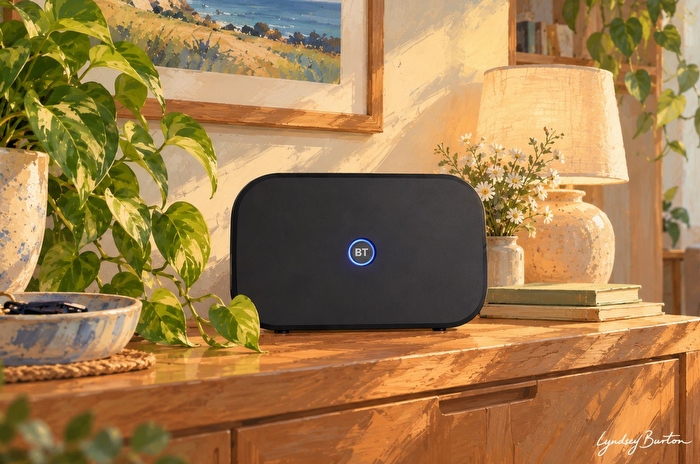
Quick answer: What is the BT Smart Hub 3?
The BT Smart Hub 3 is BT's latest WiFi 6 router, launched in May 2026 and supplied to new customers taking BT broadband.
Key facts:
- WiFi 6 router (802.11ax)
- Dual-band 2.4GHz and 5GHz wireless
- 3x3 on 2.4GHz and 4x4 MU-MIMO on 5GHz
- Seven internal WiFi antennas
- Four Gigabit Ethernet LAN ports
- 2.5Gbps WAN port for full fibre connections
- WPA3 security and Hub Threat Protect
- Works with WiFi 6 Complete Wi-Fi Plus extenders
The router is fast enough to make good use of BT's Full Fibre 500 and 900 packages, with compatible WiFi 6 devices capable of reaching around 700-900Mbps in good conditions. Speeds will fall with distance, walls and interference, while older WiFi 5 devices won't benefit fully from the newer wireless standard.
For larger homes, the Smart Hub 3 works with BT's Complete Wi-Fi Plus extenders to create a mesh network and improve coverage. Unlike the older WiFi 5 discs supplied with the Smart Hub 2, the new extenders also support WiFi 6.
Security has also been upgraded, with WPA3 encryption and Hub Threat Protect built into the router. Hub Threat Protect monitors network traffic and can block potentially malicious connections before they reach devices around the home.
The Smart Hub 3 is a substantial improvement over the Smart Hub 2, but it's still a dual-band WiFi 6 router with Gigabit LAN ports. EE already supplies WiFi 7 as standard, while EE, Vodafone and Sky also offer more advanced WiFi 7 hardware with selected packages.
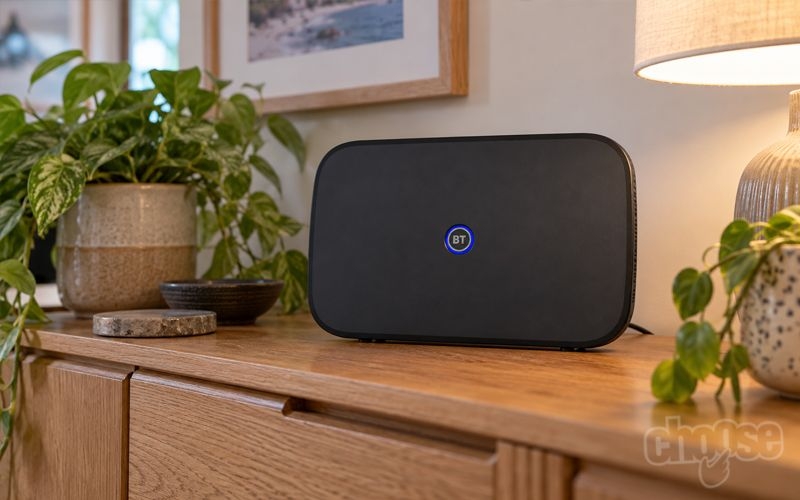
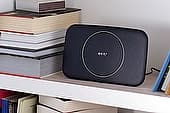
BT Smart Hub 3. Credit: Choose.co.uk
BT Smart Hub 3 specifications
The BT Smart Hub 3 is a dual-band WiFi 6 router, supporting the 802.11ax standard across the 2.4GHz and 5GHz wireless bands.
It has seven internal WiFi antennas, using a 3x3 configuration on 2.4GHz and 4x4 MU-MIMO on 5GHz to provide greater wireless capacity when several compatible devices are connected at the same time.
The main specifications are:
| Specification | BT Smart Hub 3 |
|---|---|
| WiFi standard | WiFi 6 (802.11ax) |
| WiFi bands | 2.4GHz and 5GHz |
| Antennas | 7 internal antennas |
| MIMO | 3x3 (2.4GHz) / 4x4 MU-MIMO (5GHz) |
| Ethernet LAN | 4 x Gigabit Ethernet |
| WAN | 1 x 2.5Gbps Ethernet |
| DSL | Built-in on compatible models |
| Digital Voice | Phone port and built-in DECT |
| WiFi security | WPA2 / WPA3 |
| Network security | Hub Threat Protect |
| Mesh WiFi | Complete Wi-Fi Plus |
| Broadband backup | Hybrid Connect |
| Management | MyBT app / Hub Manager |
WiFi 6 is the main upgrade over the previous Smart Hub 2, which uses the older WiFi 5 standard. As well as supporting higher wireless speeds, WiFi 6 is designed to handle more simultaneous connections efficiently, which can help in households with lots of phones, laptops, smart TVs and other connected devices.
The 2.5Gbps WAN port also gives the Smart Hub 3 more capacity between the Openreach ONT and router than its predecessor. However, this connection is used for incoming full fibre broadband rather than local devices. Each of the four Ethernet LAN ports is limited to 1Gbps, so individual wired devices can't make use of multi-gigabit speeds.
Who gets the BT Smart Hub 3?
The BT Smart Hub 3 is now the standard router provided to new BT broadband customers, regardless of the broadband speed they choose.
That means customers taking both part-fibre and full-fibre packages should receive the newer WiFi 6 router:
| Broadband | Monthly price | Contract | |
|---|---|---|---|
 |
150Mb 30Mb upload |
£23.99 | 24 months Free setup |
Offer: £80 BT Reward Card + Up to £200 switching credit £27.99 from March 2027, then £31.99 from March 2028 | |||
|
300Mb 49Mb upload |
£25.99 | 24 months Free setup |
Offer: £140 BT Reward Card + Up to £200 switching credit £29.99 from March 2027, then £33.99 from March 2028 | |||
|
500Mb 73Mb upload |
£27.99 | 24 months Free setup |
Offer: £170 BT Reward Card + Up to £200 switching credit £31.99 from March 2027, then £35.99 from March 2028 | |||
|
900Mb 110Mb upload |
£32.99 | 24 months Free setup |
Offer: £100 BT Reward Card + Up to £200 switching credit £36.99 from March 2027, then £40.99 from March 2028 | |||
Existing customers with a Smart Hub 2 won't automatically receive the newer router simply because the Smart Hub 3 has launched.
BT is offering a free Smart Hub 3 upgrade to customers still using the original Smart Hub, while Smart Hub 2 customers can choose to upgrade for £50.
This makes the Smart Hub 3 considerably more accessible than routers that are restricted to premium broadband tiers or paid WiFi upgrades, as new BT customers get WiFi 6 regardless of the package they choose.
Hardware and connectivity
The BT Smart Hub 3 retains the upright black design of the Smart Hub 2, but the hardware inside has been substantially upgraded. It has seven internal antennas, configured as 3x3 on the 2.4GHz band and 4x4 on 5GHz, with dual-band WiFi 6 (802.11ax) replacing the older WiFi 5 standard.
WiFi 6 supports higher wireless speeds and handles multiple simultaneous connections more efficiently, making the Smart Hub 3 much better suited to BT's faster full-fibre packages and households with lots of connected devices.
Wired connectivity is provided by four Gigabit Ethernet LAN ports, alongside a separate 2.5Gbps WAN port. On full-fibre connections, the WAN port connects to the Openreach Optical Network Terminal (ONT), giving the router enough incoming capacity for broadband speeds above 1Gbps.
However, the 2.5Gbps port can't be used by local devices. Computers, games consoles and other wired equipment connect through the four LAN ports and are therefore limited to 1Gbps each.
Models supplied for part-fibre broadband also include a DSL port for connecting directly to the telephone master socket. There's a phone socket and built-in DECT support for BT Digital Voice, allowing compatible handsets to connect wirelessly to the router, as well as a USB port.
The design itself remains fairly simple, with a single front LED showing the router's connection status and a WPS button for connecting compatible devices. A removable settings card on the rear contains the default WiFi and router login details.
BT has also made some environmental changes to the hardware, using recycled plastic for the router casing and switching to plastic-free packaging.
Performance and speed limits
The BT Smart Hub 3 is fast enough to make good use of BT's Full Fibre 900 package over WiFi, although customers shouldn't expect the full broadband speed on every device or throughout the home.
With a modern WiFi 6 device and a strong signal, real-world speeds can reach around 700-900Mbps. Moving further from the router can bring this closer to 500-700Mbps, while walls, interference and the wireless hardware inside individual devices can reduce speeds further.
That's a substantial improvement over the Smart Hub 2, particularly on faster full-fibre connections. Older WiFi 5 devices may only manage around 300-500Mbps in circumstances where a newer WiFi 6 phone or laptop can achieve considerably more, making device compatibility increasingly important on Full Fibre 500 and 900.
The difference matters much less on slower packages. A 70Mbps Fibre 2 connection, for example, sits well below the wireless capacity of either router, so customers are more likely to notice improvements in coverage, congestion and connection stability than outright download speed.
The Smart Hub 3 also supports 160MHz channels on the 5GHz band, allowing compatible devices to use more wireless bandwidth. This helps produce its highest speeds at shorter distances, although wider channels can become less useful in congested areas where neighbouring WiFi networks compete for the same spectrum.
Wired connections have a clearer limit. Although the router has a 2.5Gbps WAN connection from the full-fibre ONT, its four LAN ports are limited to Gigabit Ethernet. Individual wired devices therefore top out at around 940Mbps in practice, rather than the full theoretical 1Gbps.
That isn't currently a significant restriction because BT's fastest residential package offers average speeds of 900Mbps. However, the Gigabit LAN ports could become more limiting if BT introduces broadband packages above 1Gbps in the future.
Coverage is generally strong from the Smart Hub 3, and speeds should remain sufficient for streaming, video calls and everyday browsing well beyond the point at which maximum throughput begins to fall. Larger properties, thick walls and awkward router placement can still create weak spots, however, which is where BT's Complete Wi-Fi Plus extenders become more useful.
Overall, the Smart Hub 3 should be capable of delivering several hundred megabits over WiFi around a typical home and near-gigabit speeds under favourable conditions. Customers on Full Fibre 500 and 900 stand to benefit most from its WiFi 6 performance, while those on slower packages are unlikely to find wireless speed itself a limiting factor.
Complete Wi-Fi Plus
The BT Smart Hub 3 works with BT's new Complete Wi-Fi Plus extenders to create a mesh network and improve coverage in rooms that are too far from the main router.
These are different from the Complete Wi-Fi discs supplied with the Smart Hub 2. The older discs use WiFi 5 and only work with the Smart Hub 2, while the new Complete Wi-Fi Plus extenders use WiFi 6 and are designed specifically for the Smart Hub 3.
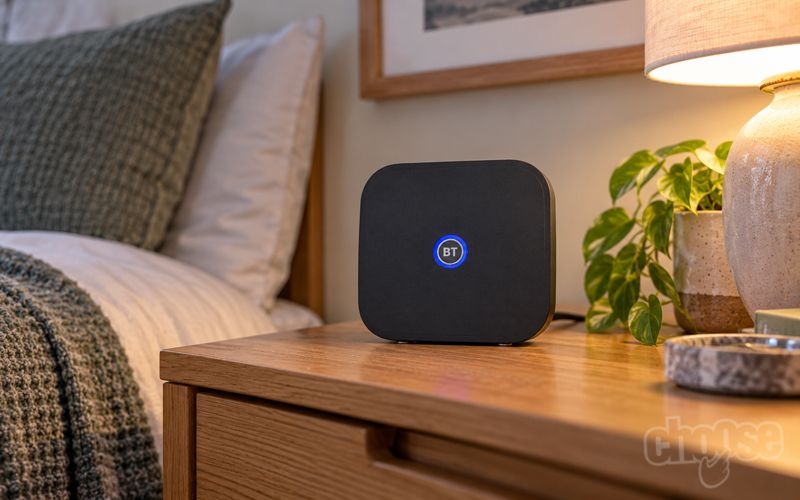
BT Complete WiFi Plus. Credit: Choose.co.uk
Like the router, each extender operates across the 2.4GHz and 5GHz bands, with a 2x2 configuration at 2.4GHz and 4x4 at 5GHz. This means extending the network doesn't require dropping back to the older WiFi 5 standard used by the previous Complete Wi-Fi system.
The extenders form part of the same wireless network as the Smart Hub 3, allowing phones, laptops and other devices to move between the router and extenders as users move around the home. Placement remains important, however, as each extender needs a sufficiently strong connection back to the main network to provide useful speeds further away.
Each Complete Wi-Fi Plus extender also has a Gigabit Ethernet port. This can be useful for connecting equipment such as a desktop PC, games console or smart TV by cable in a room away from the Smart Hub 3, although the connection back to the router may still be wireless.
Setup can be carried out through the My BT app, or an extender can be paired directly with the Smart Hub 3 using WPS. BT recommends initially placing it close to the router for pairing before moving it approximately halfway between the Smart Hub 3 and the area with poor coverage.
In practice, Complete Wi-Fi Plus should be most useful in larger or unusually shaped properties where a single Smart Hub 3 can't provide a strong signal everywhere. User experiences suggest the new extenders can make a substantial difference through thick walls and into previous WiFi dead spots, although adding a wireless mesh node won't necessarily provide the same speeds as connecting directly to the Smart Hub 3 at close range.
Importantly, existing Complete Wi-Fi customers can't simply reuse their Smart Hub 2 discs with the new router. Moving to the Smart Hub 3 requires the newer Complete Wi-Fi Plus hardware if mesh coverage is needed.
Will the BT Smart Hub 3 make a difference?
For customers upgrading from the Smart Hub 2, the Smart Hub 3 can make a noticeable difference, but how much will depend on broadband speed, the devices being used, and the size of the home.
The biggest improvement comes from the move from WiFi 5 to WiFi 6. On faster Full Fibre 500 and 900 packages, newer phones and laptops can make much better use of the available bandwidth, with speeds potentially reaching 700Mbps or more over WiFi in good conditions.
WiFi 6 should also perform better in busy households. Technologies designed to manage multiple simultaneous connections more efficiently mean homes with several people streaming, gaming, making video calls and using smart devices are more likely to benefit than households with only a handful of connected devices.
Customers on slower packages may notice much less difference in outright speed. A 70Mbps broadband connection is already comfortably within the capabilities of the Smart Hub 2, so replacing it with the Smart Hub 3 won't suddenly make the Internet connection itself faster. Improvements are more likely to come from better wireless efficiency and performance when several devices are being used at once.
Older devices are another limitation. A WiFi 5 laptop or phone will still connect to the Smart Hub 3, but it can't take advantage of WiFi 6. This means households mainly using older hardware may see relatively little benefit until those devices are replaced.
Coverage isn't necessarily transformed either. Both the Smart Hub 2 and Smart Hub 3 have seven internal antennas, and upgrading the router won't eliminate every dead spot caused by thick walls, multiple floors or poor router placement. Complete Wi-Fi Plus can make a bigger difference in these situations by extending the network into areas the main router struggles to reach.
The new Complete Wi-Fi Plus hardware is itself an improvement, however. Unlike the WiFi 5 discs used with the Smart Hub 2, the new extenders support WiFi 6, allowing faster wireless connections to be maintained across more of the home rather than reverting to the older standard when connecting through a mesh point.
Overall, customers on Full Fibre 500 or 900 with modern WiFi 6 devices have the most to gain from the Smart Hub 3. For those on slower broadband packages or mainly using WiFi 5 devices, the difference will be less dramatic, although the newer router still provides better support for increasingly connected homes.
Security upgrades
Security is another area where the BT Smart Hub 3 improves substantially on its predecessor, with WPA3 encryption and a new Hub Threat Protect feature built directly into the router.
WPA3 replaces the WPA2 security used by the Smart Hub 2, providing stronger protection for the wireless network itself. It applies across both the 2.4GHz and 5GHz bands, although older devices that don't support WPA3 can still be accommodated through the router's compatibility options.
Hub Threat Protect goes further by monitoring traffic passing through the Smart Hub 3 and automatically blocking suspicious connections before they reach devices on the home network.
This is particularly useful for connected devices such as smart TVs, cameras, doorbells and other smart-home equipment, where installing conventional antivirus software isn't usually possible. Blocked threats can be viewed and managed through the My BT app, with customers able to override individual blocks where necessary.
Hub Threat Protect is specific to the Smart Hub 3 and works at router level, rather than being a security service applied across BT's broadband network. This means customers using the older Smart Hub 2 don't automatically benefit from the same protection.
BT broadband customers also get Cyber Threat Protect at no extra cost. Powered by Norton, this provides a separate layer of security for up to 15 PCs, Macs, Android and iOS devices, including protection against malware and ransomware alongside safe browsing, dark web monitoring and a password manager.
The two services therefore perform different jobs. Hub Threat Protect protects devices while they're connected through the Smart Hub 3, including devices that can't run security software themselves, while Cyber Threat Protect can be installed directly on compatible devices and continue protecting them away from the home network.
BT also provides WiFi access controls through the My BT app, allowing individual devices to be grouped, paused or restricted at particular times, alongside its existing network-wide parental controls.
Overall, security is one of the stronger reasons to favour the Smart Hub 3 over the Smart Hub 2. WPA3 brings the router's wireless security up to date, while the combination of router-level and device-level threat protection provides broader protection than relying on antivirus software alone.
Limitations and customisation
The main limitation of the BT Smart Hub 3 is that it's still a dual-band WiFi 6 router. There's no 6GHz band or WiFi 7 support, putting it behind the latest hardware now available from some rival broadband providers.
The four LAN ports are also limited to Gigabit Ethernet. That's sufficient for BT's current broadband packages, which top out at an average 900Mbps, but leaves little room for faster wired connections if BT follows other Openreach providers in offering speeds above 1Gbps.
The 2.5Gbps WAN port means the connection between the Openreach ONT and Smart Hub 3 is already capable of handling faster broadband. However, Openreach offers a 1.6Gbps tier that's already available from providers including EE and Sky, while BT has yet to launch an equivalent residential package.
There's a reasonable amount of customisation through the Hub Manager. Customers can change network names and passwords, adjust wireless settings and manually select WiFi channels, although BT recommends leaving its Smart Scan feature to manage channels automatically.
The Smart Hub 3 normally manages its 2.4GHz and 5GHz bands automatically, moving compatible devices between them according to signal and network conditions. BT also provides a separate Compatible WiFi network on 2.4GHz for older smart-home equipment and other devices that struggle to connect to the main network.
This has been useful because the Smart Hub 3 hasn't been entirely trouble-free since launch. Firmware problems have affected connectivity for some devices and WiFi extenders, with BT recommending workarounds including fixed 2.4GHz channels and the Compatible WiFi network while fixes were rolled out.
Some of these problems are typical of compatibility issues between newer WiFi hardware and older connected devices, rather than an indication that the Smart Hub 3 is generally unreliable. However, customers with large numbers of older smart-home devices may find some require additional setup rather than connecting seamlessly to the main network.
More advanced users will also find the Smart Hub 3 restrictive compared with a dedicated third-party router. BT's residential hardware is designed primarily around automatic configuration and straightforward management rather than exposing extensive networking controls.
Using alternative equipment is possible, particularly on full fibre where a compatible third-party router can connect directly to the Openreach ONT. However, replacing the Smart Hub 3 can mean losing or complicating integrated BT features including Complete Wi-Fi Plus, Hybrid Connect and Digital Voice.
For most households these limitations won't matter, but the Smart Hub 3 is ultimately designed to be an easy-to-manage ISP router rather than high-end networking hardware. Customers wanting WiFi 7, multi-gigabit Ethernet or more extensive control over their home network will find more capable options elsewhere.
Can you replace the BT Smart Hub 3 with your own router?
BT customers can replace the Smart Hub 3 with their own router, although how straightforward this is depends on the type of broadband connection and which BT services they use.
On a full-fibre connection, the Openreach ONT already acts as the modem, so a third-party router can be connected directly to it by Ethernet. The router needs to support PPPoE and be configured with BT's broadband login details.
This can be worthwhile for customers wanting features the Smart Hub 3 lacks, such as WiFi 7, tri-band mesh WiFi, multi-gigabit Ethernet, more advanced network controls or better support for VPNs and custom DNS settings.
However, replacing the Smart Hub 3 can mean losing BT-specific features. Complete Wi-Fi Plus and Hybrid Connect are designed to work with BT's own router, while Digital Voice can also complicate using third-party hardware.
Customers on part-fibre broadband need a router with a compatible VDSL modem built in, or a separate modem alongside their chosen router. The Smart Hub 3 doesn't offer a straightforward modem-only mode for residential customers, so it can't simply be put into bridge mode and used as a modem with another router.
For most customers, the Smart Hub 3 provides enough performance and functionality without needing to replace it. However, using a third-party router remains a useful option for more advanced users, particularly on full fibre where the router can be connected directly to the Openreach ONT.
How the BT Smart Hub 3 compares
The BT Smart Hub 3 compares well with the standard routers supplied by other major broadband providers, with WiFi 6 also used by Sky, Vodafone and Virgin Media.
| Router | WiFi | Bands | Wireless configuration | Ethernet |
|---|---|---|---|---|
| BT Smart Hub 3 | WiFi 6 | Dual-band | 3x3 2.4GHz / 4x4 5GHz | 4 x 1Gbps LAN |
| EE Smart Hub 7 Plus | WiFi 7 | Dual-band | 2x2 2.4GHz / 4x4 5GHz | 2.5Gbps + Gigabit |
| Sky Max Hub | WiFi 6 | Dual-band | 4x4 | 4 x 1Gbps |
| Vodafone Power Hub | WiFi 6 | Dual-band | 4x4 | 4 x 1Gbps |
| Virgin Media Hub 5 | WiFi 6 | Dual-band | 3x3 2.4GHz / 4x4 5GHz | 1 x 2.5Gbps + 3 x 1Gbps |
The Smart Hub 3 is most closely matched by the Sky Max Hub, Vodafone Power Hub and Virgin Media Hub 5, which also use dual-band WiFi 6. For most customers, differences in coverage, router placement and individual device capability are therefore likely to matter more than the headline WiFi standard.
Virgin Media has an advantage for wired devices, as its Hub 5 includes a 2.5Gbps Ethernet port that can be used by a connected device. The Smart Hub 3 has a 2.5Gbps port too, but this is used for the WAN connection from the Openreach ONT, leaving its four LAN ports limited to 1Gbps.
EE stands out among the standard routers by supplying WiFi 7 with its Smart Hub 7 Plus. It's still a dual-band router without access to the newer 6GHz frequency band, but supports the newer WiFi standard and offers a 2.5Gbps Ethernet connection.
The differences become greater when looking at the upgraded hardware available from rival providers. EE, Vodafone and Sky all offer more advanced routers with selected premium or faster broadband packages, while the Smart Hub 3 remains the best router currently available directly from BT.
| Router | WiFi | Bands | Multi-gigabit LAN | Availability |
|---|---|---|---|---|
| BT Smart Hub 3 | WiFi 6 | Dual-band | No - 1Gbps | BT's latest router |
| EE Smart Hub 7 Pro | WiFi 7 | Tri-band | 4 x 2.5Gbps | Selected premium packages |
| Vodafone Ultra Hub 7 | WiFi 7 | Tri-band | Yes | Pro 3 broadband |
| Sky Gigafast+ Hub | WiFi 7 | Tri-band | Up to 10Gbps | Gigafast+ packages |
EE's Smart Hub 7 Pro is a substantial step up, supporting tri-band WiFi 7 across the 2.4GHz, 5GHz and 6GHz frequencies. It also has four 2.5Gbps LAN ports, allowing individual wired devices to make use of broadband and local network speeds above 1Gbps.
Vodafone similarly offers its Ultra Hub 7 to customers taking Pro 3 broadband. This moves from the WiFi 6 Power Hub supplied with standard packages to tri-band WiFi 7, with a matching Super WiFi 7 Booster available to extend the newer wireless standard around the home.
Sky has also moved beyond the WiFi 6 Max Hub for its fastest packages. Its Gigafast+ Hub supports tri-band WiFi 7 and multi-gigabit Ethernet, including connectivity up to 10Gbps, and is supplied with selected Gigafast+ broadband plans.
BT doesn't currently offer an equivalent premium router upgrade. Customers remain on the Smart Hub 3, leaving no BT-supplied option for WiFi 7, the 6GHz wireless band or multi-gigabit LAN connectivity.
This isn't a major limitation while BT's residential broadband packages themselves remain capped at 900Mbps. However, Openreach already offers wholesale speeds up to 1.6Gbps, which are sold by EE and other providers, while Sky has recently launched even faster multi-gigabit packages in enabled areas.
Overall, the Smart Hub 3 is competitive with the standard WiFi 6 routers offered by most major providers and is a substantial improvement over the Smart Hub 2. Yet BT is increasingly behind at the premium end of the market, where rival providers now combine faster broadband with WiFi 7 and multi-gigabit networking hardware.
Verdict: Does the BT Smart Hub 3 matter when choosing BT broadband?
The Smart Hub 3 is a significant improvement for BT broadband, finally replacing the ageing WiFi 5 Smart Hub 2 with a faster WiFi 6 router that's much better suited to modern full-fibre connections.
Performance should be strong enough for most households, including customers on Full Fibre 500 and 900. Modern WiFi 6 devices can achieve several hundred megabits around the home and potentially much closer to the full line speed when near the router, while improved management of multiple connections should help in busier households.
BT has improved more than wireless speed too. Complete Wi-Fi Plus extends WiFi 6 throughout larger homes using the new extenders, while WPA3, Hub Threat Protect and the included Norton-powered Cyber Threat Protect give BT a particularly comprehensive set of security features without requiring an additional subscription.
There are limitations, however. The Smart Hub 3 remains dual-band WiFi 6, its four LAN ports are limited to 1Gbps, and BT doesn't offer a more advanced router upgrade. EE already supplies WiFi 7 as standard, while EE, Vodafone and Sky offer higher-specification WiFi 7 hardware with selected premium or faster packages.
That matters more as broadband speeds move beyond 1Gbps. Openreach already supports 1.6Gbps connections and rival providers are selling them, while BT itself remains limited to 900Mbps. The Smart Hub 3's 2.5Gbps WAN port provides some headroom for faster services, but its Gigabit LAN ports and WiFi 6 hardware make it less future-proof than the best ISP routers now available.
Overall, the Smart Hub 3 removes one of the main weaknesses of BT broadband and gives customers a capable router with good WiFi 6 performance, optional whole-home coverage and unusually strong security features. It's unlikely to be the sole reason to choose BT, but the router is now a positive part of the package rather than a compromise customers have to accept.