Major brands including Amazon, Google and Roku offer a small number of current streaming devices in the UK, with clear differences in price, performance and platform approach.
For most households, the Amazon Fire TV Stick 4K Max is the strongest all-round option, offering fast performance, wide app support and Alexa voice control at a mid-range price.
At the cheaper end, Roku's entry-level Roku Streaming Stick (HD) is now the most affordable way to add smart features to a TV, while Google's newer Google TV Streamer (4K) offers a more powerful, box-style alternative with a full Google TV interface and voice remote.
Which smart TV stick should I choose?
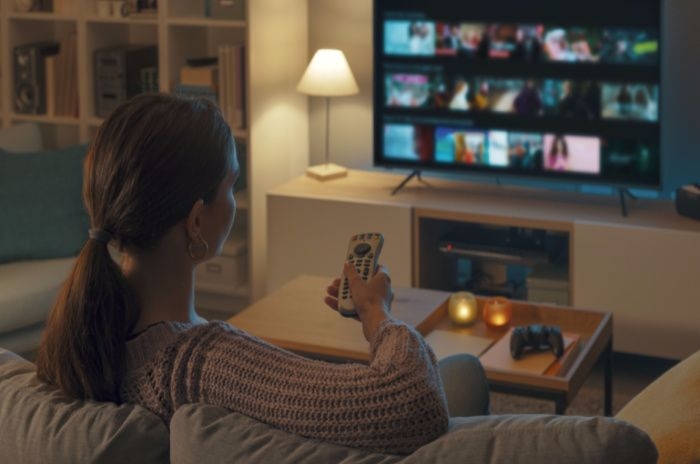
If you want to add smart features to an existing TV - or access newer apps that your TV no longer supports - a streaming stick or small set-top box is one of the easiest ways to do it. These devices plug into your TV's HDMI port and connect to your home Wi-Fi to deliver apps, catch-up services and premium streaming.
Main types of streaming device
There are four major streaming platforms available in the UK right now, each with slightly different strengths and ecosystem approaches:
- Amazon Fire TV - A widely supported platform with good performance and deep integration with Amazon services and Alexa voice control.
- Google TV - Google's current TV platform, now delivered via devices such as the Google TV Streamer (4K). It combines a full on-screen interface, personalised recommendations and Google Assistant, with optional casting from phones and laptops.
- Roku - A simple, neutral streaming interface with a broad app library and minimal ecosystem lock-in.
- Apple TV - A premium box with polished performance, excellent app support and deep integration for Apple users (AirPlay, iCloud, etc.).
Below we take a closer look at the current devices available from each manufacturer, then highlight our top picks for 2026 based on overall performance, value and usability.
Current streaming sticks & boxes by platform
Amazon Fire TV
Amazon currently sells four Fire TV sticks in the UK, covering everything from basic HD streaming to higher-performance 4K models.
- Fire TV Stick HD - Entry-level option for Full HD TVs.
- Fire TV Stick 4K Select - A lower-cost 4K stick using Amazon's newer Vega OS, with more restricted app support.
- Fire TV Stick 4K Plus - A mid-range 4K option with broader app compatibility and better performance than the Select model.
- Fire TV Stick 4K Max - The fastest Fire TV stick, with the most memory and Wi-Fi 6 support.
For most households, the Fire TV Stick 4K Max remains the best overall choice. It offers the smoothest performance, the widest app compatibility and the most future-proof networking support, making it better suited to long-term use than the cheaper alternatives.
The newer Fire TV Stick 4K Select takes a more locked-down approach by limiting sideloading and third-party apps. While this may appeal to users who want fewer security or legal risks, it also reduces flexibility compared with the 4K Plus and 4K Max models.
Google TV
- Google TV Streamer (4K) - Google's current streaming device, delivered as a compact set-top box rather than a stick. It offers a full Google TV interface, personalised recommendations, Google Assistant voice control and built-in casting from phones, tablets and laptops.
Google TV devices focus on bringing together multiple streaming subscriptions in one place, with strong search and recommendation features driven by your Google account.
Roku
Roku's current UK lineup is now entirely stick-based and focuses on simplicity and wide app availability:
- Roku Streaming Stick 4K - Roku's top stick, offering 4K HDR streaming with a clean, neutral interface and broad UK app support.
- Roku Streaming Stick Plus - A more affordable 4K HDR option that retains the same Roku interface and app selection, but without some higher-end features.
- Roku Streaming Stick (HD) - Entry-level HD streaming stick, replacing older Express models as Roku's cheapest option.
Roku devices are well suited to viewers who want a straightforward, platform-neutral experience without heavy promotion of a single streaming service.
Apple TV
This is a more capable set-top box rather than a stick - but it's often included in "make your TV smart" guides because of its premium performance and app ecosystem:
- Apple TV 4K - Powerful streamer with tvOS, AirPlay support and excellent HDR performance.
- Ideal if you're invested in the Apple ecosystem (iPhone, iPad, HomeKit, Apple Music/TV+).
Which is the best overall?
Our top picks, and the devices we focus on in detail below, are:
- Amazon Fire TV Stick 4K Max - Best all-round streamer
- Apple TV 4K - Best premium experience
- Roku Streaming Stick 4K - Best value and simplest interface
- Google TV Streamer (4K) - Best Google-powered streaming device
We explain why these stand out next, including performance, security differences and app support, so you can decide which suits your setup.
Prices at a glance
The table below shows the typical UK prices for each of our recommended devices. Prices vary by retailer and promotions, but this gives a useful comparison.
| Device | Type | Typical price |
|---|---|---|
| Amazon Fire TV Stick 4K Max | Streaming stick | £45-£60 |
| Roku Streaming Stick 4K | Streaming stick | £40-£50 |
| Google TV Streamer (4K) | Set-top box | £90-£110 |
| Apple TV 4K | Set-top box | £130-£150 |
Amazon Fire TV Stick 4K Max
If you want a Fire TV device in 2026, the best overall choice for most households is the Amazon Fire TV Stick 4K Max.
It offers the strongest balance of performance, app support and future-proofing in Amazon's current line-up, making it the most straightforward recommendation for anyone looking to upgrade an existing TV.
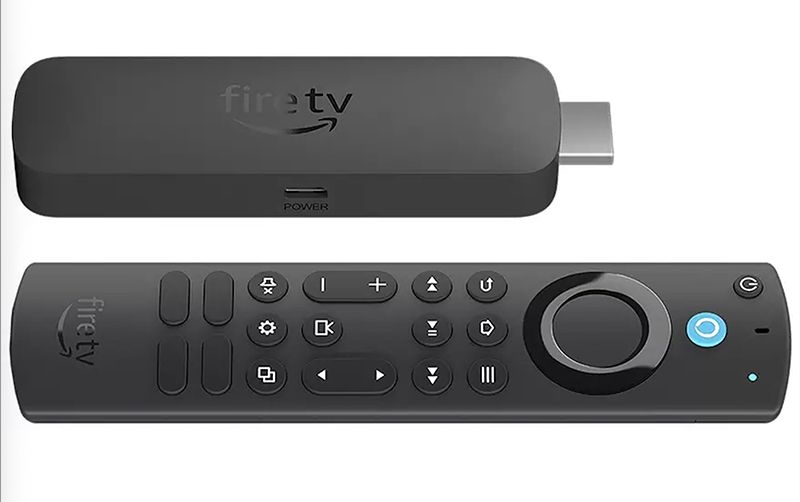
Why we recommend the Amazon Fire TV Stick 4K Max
- Fast, reliable performance for 4K streaming, with more memory and a faster processor than cheaper Fire TV sticks
- Wide app support, including Netflix, Prime Video, Disney+, Apple TV+, BBC iPlayer, ITVX, Channel 4, My5 and YouTube
- Wi-Fi 6 support, which can improve stability on busy home networks (with a compatible router)
- Alexa voice control and TV controls built into the remote
Amazon Fire TV Stick 4K Max specifications
| Feature | Specification |
|---|---|
| Video resolution | Up to 4K Ultra HD |
| HDR support | Dolby Vision, HDR10, HDR10+ |
| Audio | Dolby Atmos (via HDMI passthrough) |
| Memory (RAM) | 2GB |
| Wireless | Wi-Fi 6 |
| Remote | Alexa Voice Remote with TV controls |
| Streaming apps | Netflix, Prime Video, Disney+, Apple TV+, BBC iPlayer, ITVX, Channel 4, My5, YouTube and others |
Things to be aware of
The Fire TV interface places a strong emphasis on Amazon content, and paid rentals or purchases are often shown alongside included streaming options. While this doesn't affect app availability or streaming quality, it may feel busier than more neutral platforms such as Roku.
The Fire TV Stick 4K Max does not require an Amazon Prime subscription, but Prime members will also get access to Amazon Originals and other Prime Video content.
Security and platform differences
Amazon also sells the Fire TV Stick 4K Select, which uses a newer operating system designed to restrict installation of apps outside the official Amazon Appstore. This reduces the ability to sideload third-party apps, a practice often associated with modified or "fully loaded" streaming devices.
This more locked-down approach may appeal to users who want fewer security or legal risks, particularly as enforcement activity has increasingly focused on the use of unauthorised streaming services rather than just the sellers of those services.
However, the tighter restrictions also reduce flexibility compared with the Fire TV Stick 4K Max, including more limited support for some legitimate third-party apps.
Overall, the Amazon Fire TV Stick 4K Max remains the best Fire TV option for most people - and one of the strongest streaming sticks available in the UK right now.
Apple TV 4K
If you want a premium streaming experience and already use Apple devices, the Apple TV 4K is the best option available.
Unlike streaming sticks, Apple TV is a compact set-top box rather than a dongle, offering more processing power, a highly polished interface and long-term software support.
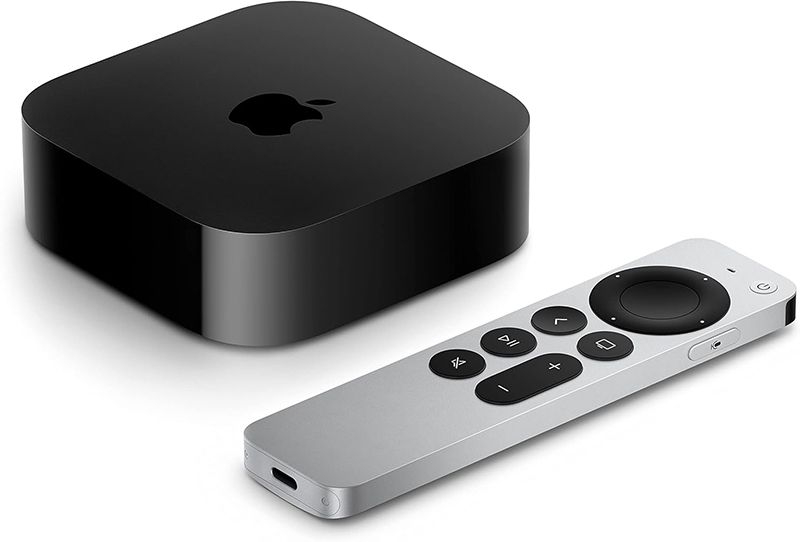
Why we recommend Apple TV 4K
- Smooth, fast performance thanks to powerful hardware compared with most streaming sticks
- Clean, ad-light interface with less emphasis on paid promotions than many rivals
- Excellent app support, including Netflix, Prime Video, Disney+, Apple TV+, BBC iPlayer, ITVX, Channel 4, My5 and YouTube
- Strong ecosystem integration with iPhone, iPad and Mac via AirPlay and iCloud
Apple TV 4K works particularly well in households already using Apple services, but it can also be used as a standalone streaming box without subscribing to Apple TV+.
Apple TV 4K specifications
| Feature | Specification |
|---|---|
| Video resolution | Up to 4K Ultra HD |
| HDR support | Dolby Vision, HDR10+ |
| Audio | Dolby Atmos |
| Wireless | Wi-Fi, Bluetooth |
| Remote | Siri Remote with touchpad and voice control |
| Streaming apps | Netflix, Prime Video, Disney+, Apple TV+, BBC iPlayer, ITVX, Channel 4, My5, YouTube and others |
Things to be aware of
Apple TV 4K is significantly more expensive than most streaming sticks and may be more than you need if you simply want basic access to streaming apps.
It also lacks the compact, hidden design of HDMI sticks, as it needs to sit near your TV like a traditional set-top box.
For viewers who prioritise performance, interface quality and long-term updates - particularly those already invested in the Apple ecosystem - Apple TV 4K remains one of the strongest ways to make a TV smart.
Roku Streaming Stick 4K
If you want a simple, low-friction streaming experience without heavy ecosystem push, the Roku Streaming Stick 4K is the best Roku device for most people in 2026.
It combines strong app support with one of the cleanest, most neutral interfaces available, making it a good choice for viewers who want streaming without constant promotion or platform lock-in.

Why we recommend the Roku Streaming Stick 4K
- Simple, uncluttered interface that puts apps front and centre
- Wide UK app support, including Netflix, Disney+, Prime Video, Apple TV+, BBC iPlayer, ITVX, Channel 4, My5 and YouTube
- 4K HDR support in a compact stick design that connects over Wi-Fi
- Easy setup with a straightforward remote and minimal configuration
Roku works well as a neutral hub for multiple streaming services and does not prioritise content from a single provider in the way some other platforms do.
Roku Streaming Stick 4K specifications
| Feature | Specification |
|---|---|
| Video resolution | Up to 4K Ultra HD |
| HDR support | HDR10, HDR10+ |
| Audio | Dolby Audio (via HDMI) |
| Wireless | Wi-Fi |
| Remote | Simple voice remote |
| Streaming apps | Netflix, Prime Video, Disney+, Apple TV+, BBC iPlayer, ITVX, Channel 4, My5, YouTube and others |
Things to be aware of
Roku's remotes are deliberately simple and typically do not include full TV power or volume controls, meaning you may need to use your TV's original remote alongside it.
During setup, Roku asks users to add a payment method to their account. You are not required to buy any additional content, but paid channels and rentals are clearly presented within the platform, so it's worth paying attention to what you're signing up for.
Other Roku options
If you want a slightly cheaper alternative, the Roku Streaming Stick Plus offers many of the same benefits, including 4K HDR streaming and access to Roku's full app library, but without some higher-end features such as Dolby Vision. It's a good option if you want 4K streaming at a lower price.
For the lowest upfront cost, the Roku Streaming Stick (HD) is Roku's entry-level option. It supports Full HD streaming and the same Roku interface, but lacks 4K and HDR support, making it better suited to older TVs or secondary rooms.
Overall, the Roku Streaming Stick 4K remains the best choice for most people, balancing price, performance and simplicity without heavy platform promotion.
Google TV
If you want a Google-powered streaming device in 2026, the main option to consider is the Google TV Streamer (4K).
It is a compact set-top box rather than a stick, and runs Google's Google TV platform with a full on-screen interface, voice remote and built-in casting support.
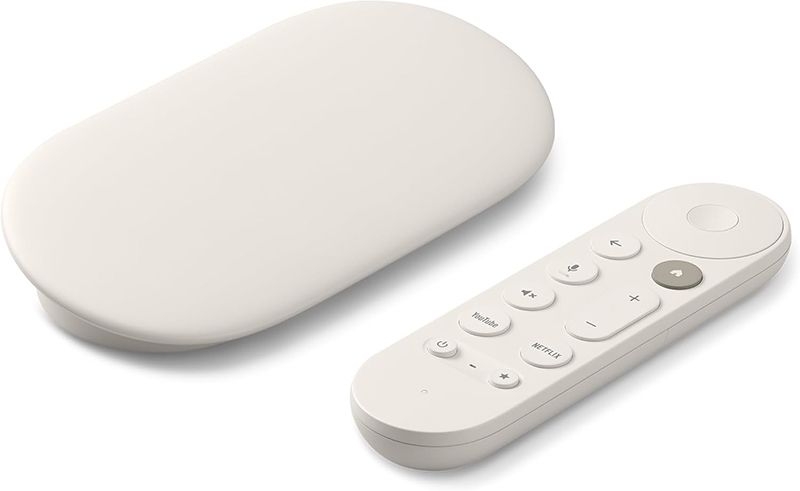
Why we recommend Google TV Streamer (4K)
- Full smart TV interface, with apps, menus and personalised recommendations shown directly on screen
- Built-in Chromecast, allowing you to cast content from phones, tablets and laptops when you want to
- Wide UK app support, including Netflix, Disney+, Prime Video, Apple TV+, BBC iPlayer, ITVX, Channel 4, My5 and YouTube
- Google Assistant voice control via the remote
This makes it a good choice for households already using Android phones, Google accounts or Google smart home devices, while still working well as a standalone streaming hub.
Google TV Streamer (4K) specifications
| Feature | Specification |
|---|---|
| Video resolution | Up to 4K Ultra HD |
| HDR support | HDR10, HDR10+, Dolby Vision |
| Audio | Dolby Atmos support |
| Wireless | Wi-Fi |
| Remote | Voice remote with Google Assistant |
| Streaming apps | Netflix, Prime Video, Disney+, Apple TV+, BBC iPlayer, ITVX, Channel 4, My5, YouTube and others |
What about Chromecast?
Older Chromecast devices, including Chromecast with Google TV, are still supported but are no longer Google's primary streaming products.
Basic Chromecast models rely entirely on casting from a phone, tablet or laptop and do not include a remote or full on-screen interface. While they can still be useful for mirroring content, they are less practical as a complete smart TV solution.
For most people looking to make a TV smarter rather than simply cast content occasionally, the Google TV Streamer (4K) is the more capable and future-proof option.
Freeview and Freely TV boxes
Streaming sticks aren't the only way to make a TV smarter. Some UK-focused TV boxes are built around live TV services such as Freeview or Freely, with streaming and catch-up apps added alongside.
These devices are best thought of as Freeview or Freely boxes with smart TV features built in, rather than alternatives to streaming sticks.
How these boxes are different
Freeview and Freely boxes are designed primarily for watching live UK TV channels, with on-demand and streaming apps integrated into the same interface.
- Freeview boxes typically rely on a TV aerial to receive live channels.
- Freely boxes deliver live TV over broadband instead, removing the need for an aerial.
Manufacturers such as Netgem offer devices in this category, combining live TV guides, catch-up services and a limited selection of streaming apps in one place.
Who are these boxes best for?
Freeview and Freely boxes can be a good fit if you:
- mainly watch live UK TV channels
- want an all-in-one TV guide and catch-up experience
- prefer a traditional set-top box interface
- don't want to rely on a separate streaming stick
However, these platforms usually offer a smaller app selection and fewer software updates than mainstream streaming sticks, and they are not always compatible with every major streaming service. Find out more in our guide to the cheapest Freeview box to watch TV.
If your priority is on-demand streaming from services like Netflix, Disney+ or Apple TV+, a dedicated streaming stick or box is usually the better option.
Verdict: options for every budget
Streaming sticks and TV boxes have become one of the most popular ways to make a TV smart, as subscription services and on-demand apps have continued to expand.
Alongside major platforms such as Netflix and Disney+, smaller services like BritBox and STARZ have also entered the market, giving viewers more choice - and more fragmentation - than ever before.
Streaming sticks and boxes provide a simple way to bring all of this content together in one place, with prices ranging from budget-friendly options to more powerful premium devices.
Questions to ask before you buy
- Do you want the best all-round option?
The Amazon Fire TV Stick 4K Max is the strongest choice for most people, combining performance, app support and value. - Do you want the simplest, least cluttered experience?
Roku devices are well suited to viewers who want a straightforward interface without heavy ecosystem promotion. - Are you already invested in Google or Apple?
The Google TV Streamer (4K) works best for households using Google accounts and Android devices, while the Apple TV 4K is best suited to those already using Apple products and services. - Do you need 4K and HDR support?
If your TV supports 4K, choosing a device that matches it will give you better picture quality and help future-proof your setup. - Which apps matter most to you?
Most major streaming apps are widely supported, but it's still worth checking compatibility if you rely on a specific service.
For most households, a streaming stick is a cost-effective way to upgrade an older TV and create a central hub for the services they already subscribe to.
Just be mindful of ongoing subscription costs, and review which services you actually use to avoid paying for content you no longer watch.
Affiliate disclosure: This guide includes affiliate links. If you choose to buy through them, Choose may earn a small commission at no extra cost to you. We only recommend products we believe offer genuine value to consumers, regardless of commercial relationships.